


One command. Every misconfiguration and known CVE. Clear fixes.
OpenClaw is powerful. It gives AI agents the ability to execute commands, read files, manage sessions, and interact across messaging platforms. That power comes with real risk — and most gateway operators don’t know what they’ve left exposed until something goes wrong.
Today we’re open-sourcing Carapace, a security auditing CLI built specifically for OpenClaw gateways. Run one command, get a full security report: misconfigurations, known vulnerabilities, a letter grade, and actionable fixes.
npm install -g @cochatai/openclaw-carapace
openclaw-carapace audit
That’s it. No configuration required.
Why We Built This
At CoChat, we run OpenClaw as the backbone of our integration layer. When we started hardening our own deployments, we realized there was no standard tooling for answering a basic question: is this gateway secure?
OpenClaw’s default configuration is permissive by design. Sandbox mode is off. Exec tools are available. DM policies can be wide open. For development, that’s fine. For anything facing real users or untrusted input? It’s a problem.
We kept finding the same patterns across our own setups and others in the community:
- Sandboxing disabled with exec tools still enabled (CWE-78: command injection)
- Gateway tool left on, letting agents modify their own configuration
- DM policies set to “open” where any user can trigger agent sessions
- No loop detection, meaning a prompt injection could spin an agent indefinitely
- Running versions with known CVEs without realizing it
We needed something that could catch all of this automatically. So we built it.
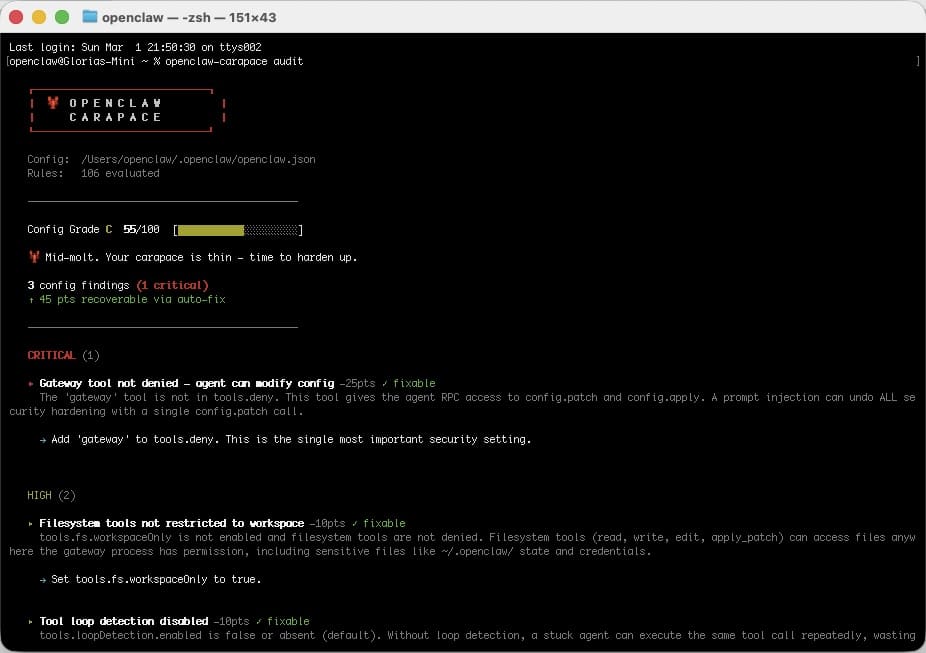
What Carapace Does
Config Audit — 24 Rules, 4 Severity Levels
Carapace ships with 24 built-in audit rules organized by severity:
- 8 Critical — sandbox disabled, no auth on gateway bind, elevated permissions enabled, gateway tool exposed
- 7 High — open DM policies, exec without sandbox, full tool profiles on public-facing bots
- 8 Medium — missing loop detection, workspace restrictions not set, weak session scoping
- 1 Low — informational findings that represent minor hardening opportunities
Each rule is a YAML file with a declarative check definition. Here’s what a critical rule looks like:
id: sandbox.mode_off
severity: critical
title: "Sandboxing disabled — exec runs on host"
description: >
Sandbox mode is 'off' and exec tools are not denied. All command
execution runs directly on the gateway host. A prompt injection
can execute arbitrary commands.
recommendation: >
Set agents.defaults.sandbox.mode to 'non-main' or 'all',
or deny exec tools via tools.deny.
config_path: agents.defaults.sandbox.mode
auto_fixable: true
mitigates_cwes: ["CWE-78", "CWE-250"]
check:
type: cross_field
conditions:
- path: agents.defaults.sandbox.mode
op: eq
value: "off"
- path: tools.deny
op: not_contains
value: exec
- path: tools.deny
op: not_contains
value: "group:runtime"
Rules aren’t just flags — they map to CWEs, include remediation steps, and many are auto-fixable with config patches.
Live CVE Checking — 225+ Advisories
Carapace pulls from the OpenClaw CVE database and checks your gateway.version against every known advisory. It fetches live GHSA and CVE data, caches it locally (1-hour TTL), and falls back gracefully to cache when offline.
Each vulnerability check includes the CVE/GHSA ID, CVSS score, affected CWEs, and the exact version you need to upgrade to.
openclaw-carapace audit # config + CVE checks
openclaw-carapace audit --no-vulns # config only
openclaw-carapace audit --offline # use cached CVE data
Skill Scanner — Static Analysis for Untrusted Skills
OpenClaw’s skill system lets agents load external capabilities. That’s great for extensibility and terrible for trust boundaries. Carapace includes a dedicated skill scanner that performs:
- Static analysis — regex pattern matching across source files (
.ts,.js,.py,.json,.sh) looking for dangerous patterns like credential access, reverse shells, and exfiltration attempts - Blocklist matching — checks skill metadata (author, name, file hashes) against known-malicious indicators, including C2 IP addresses and domains embedded in source code
openclaw-carapace skill scan ./my-skill --author "untrusted-dev"
If a skill is blocklisted, Carapace exits with code 3. No ambiguity.
Exec Firewall Patterns
Carapace ships with curated regex pattern catalogs for exec command filtering. The dangerous.yaml catalog covers:
- Destructive file operations (
rm -rf /,mkfs,ddto devices) - Credential theft (
cat .ssh/, reading.envfiles, OpenClaw state files) - Remote code execution (
curl | sh, netcat reverse shells, base64-decoded payloads) - System modification (
chmod 777,crontabedits,systemctlchanges) - Network reconnaissance (
nmap, lateral movement viascp)
These patterns are designed to be plugged into OpenClaw’s exec firewall configuration. List them with:
openclaw-carapace patterns
Hardening Profiles
Not sure where to start? Carapace includes pre-built hardening profiles that generate config patches for common deployment scenarios:
| Profile | Use Case |
|---|---|
| locked-down | Maximum security. Denies all runtime, filesystem, and automation tools. Forces sandboxing on all sessions. For messaging-only bots exposed to untrusted users. |
| messaging-safe | Messaging bots that need session management but no exec or filesystem access. |
| coding-safe | Development assistants that need exec tools but with sandbox enforcement and workspace restrictions. |
| dm-hardened | Tightened DM scope and discovery settings for multi-user environments. |
openclaw-carapace profiles list
openclaw-carapace profiles show locked-down
Each profile outputs a JSON config patch you can apply directly to your openclaw.json.
Scoring and Output
Every audit produces a security score (0–100) and a letter grade (A through F). Only misconfiguration findings affect the grade — vulnerability findings are reported separately as informational.
Severity weights:
| Severity | Points Deducted |
|---|---|
| Critical | 25 |
| High | 15 |
| Medium | 5 |
| Low | 1 |
A single critical finding drops you from an A to a B. Two criticals and you’re already at C. The scoring is deliberately aggressive — in security, the defaults should be safe.
Output formats:
openclaw-carapace audit --format text # Human-readable (default)
openclaw-carapace audit --format json # Machine-readable
openclaw-carapace audit --format sarif # For GitHub Code Scanning / CI integration
The SARIF output plugs directly into GitHub’s security tab, making it trivial to add Carapace to your CI pipeline.
Exit Codes for CI
Carapace uses meaningful exit codes so you can gate deployments:
| Code | Meaning |
|---|---|
| 0 | Clean — no critical or high findings |
| 1 | High severity findings detected |
| 2 | Critical severity findings detected |
| 3 | Skill blocklist match (skill scan only) |
Add it to your GitHub Actions workflow:
- name: Security audit
run: npx @cochatai/openclaw-carapace audit --format sarif > carapace.sarif
- name: Upload SARIF
uses: github/codeql-action/upload-sarif@v3
with:
sarif_file: carapace.sarif
Extensible by Design
Everything in Carapace is data-driven. Rules, patterns, profiles, and blocklists are all YAML files. The engine supports 12 check types:
value_equals, value_in_set, value_not_in_list, truthy, key_exists, string_length, string_match, cross_field, iterate_map, scan_keys, url_check, and version_compare.
Want to add a rule for your team? Drop a YAML file in a directory and point Carapace at it:
openclaw-carapace audit --rules-dir ./our-rules
Custom profiles and patterns work the same way.
What’s Next
Carapace is at v0.2.1. It’s stable, tested, and we use it on every CoChat deployment. Here’s what’s coming:
- Auto-fix mode — apply config patches for auto-fixable findings with a single flag
- Watch mode — continuous monitoring that re-audits on config file changes
- Community rules — a shared repository of rules contributed by the OpenClaw community
- Deeper skill analysis — AST-level scanning beyond regex patterns
Get Started
npm install -g @cochatai/openclaw-carapace
openclaw-carapace audit -c ./openclaw.json
MIT licensed. GitHub → · npm →
If you’re running OpenClaw in any capacity — especially if agents can talk to untrusted users — you should know your security score. One command, no excuses.
Built by CoChat. We build secure, collaborative AI workspaces. Carapace is how we keep our own house in order, and now it’s yours too.
