Student or educator? Sign up with your school email and get 6 months of Pro free.

LIBRARY

Every paper you’ve touched, finally in one place you can trust.

Ask any researcher where their papers live and you get a sheepish answer: some in Zotero, a few starred in Scholar, a dozen PDFs lost in Downloads, and forty alerts you meant to read. Library is the fix, a private space inside CoChat that holds every paper you’ve touched, across all your projects and questions, in one place you can search, rank, and trust.
Free to start. Import your Zotero library, search the literature, and let new papers come to you.
WHAT IT IS

What is the Library?

Library is your private home for every research paper you've touched inside CoChat, organized across all your projects and questions. You search the literature, keep what matters, and every source is checked against the academic record as it comes in, so the corpus you build is not just organized, it is dependable.

Papers you find, papers you import, and papers that find you all land in one searchable home, grouped by the questions you are actually answering, ranked by how much they matter, and verified in the background.
HOW IT WORKS

Four tabs, one system

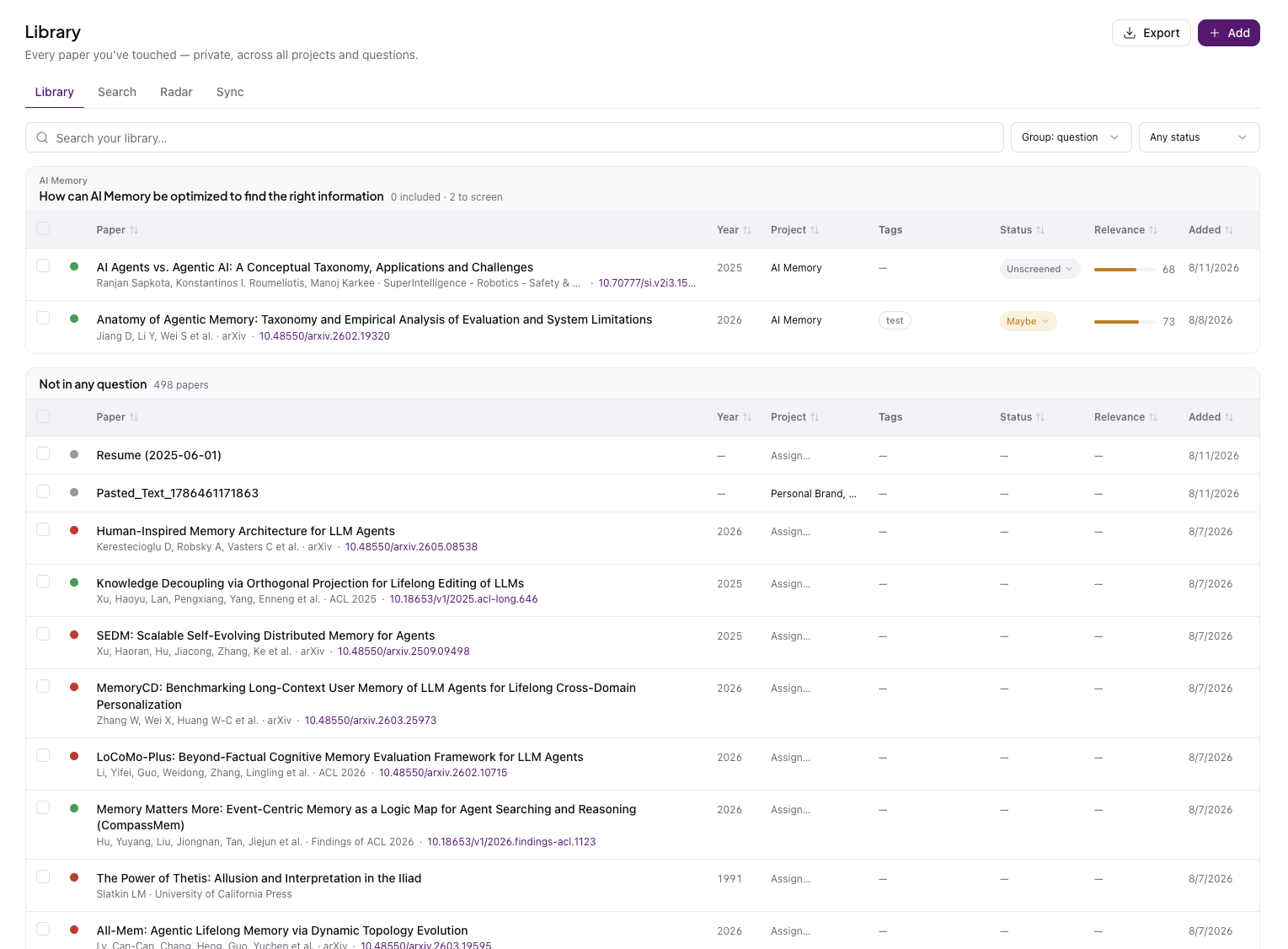
CoChat Library main screen with overview of files, resources, and verified citations

Every paper, one home

• Grouped by research question, showing how many papers are included and how many are still to review

• Screen Unscreened, Maybe, or Included and set relevance

• Open any paper to its Claims, full PDF, and a snapshot written against your question
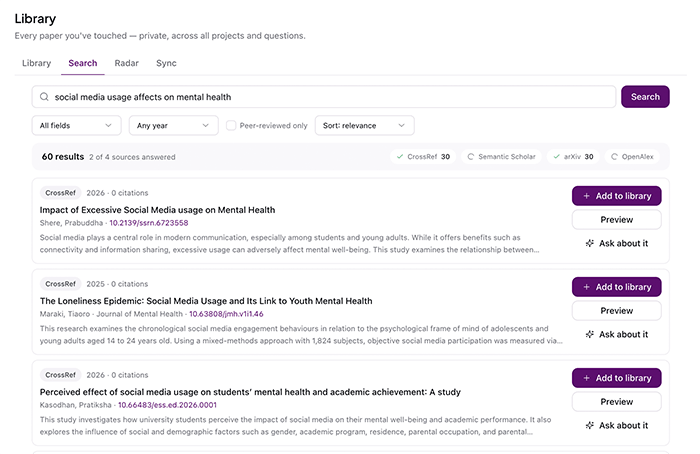
CoChat Library screen for Search feature

Find it, keep it

• Search arXiv, CrossRef, OpenAlex, PubMed, and more at once

• Duplicates merged, peer-reviewed filter optional

• Add any paper to your Library in one click
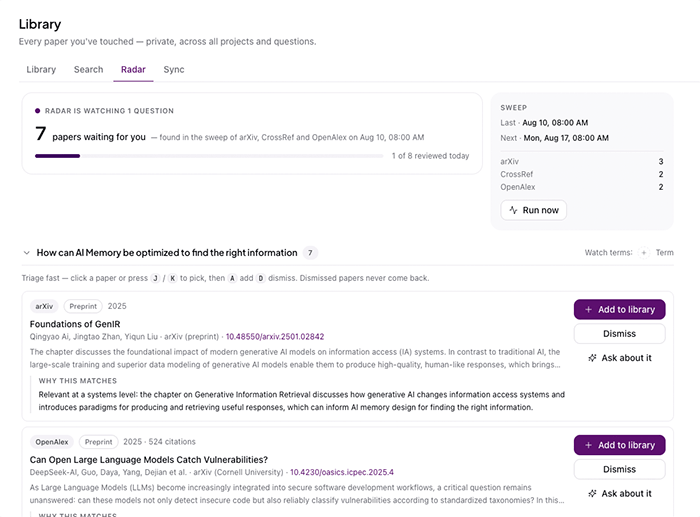
CoChat Library Radar screen importing papers on a weekly basis to user library

Let it come to you

• Watches your research questions for new papers

• Sweeps weekly or on demand, a queue, not an inbox

• Each paper notes why it matched, one-keystroke add or dismiss
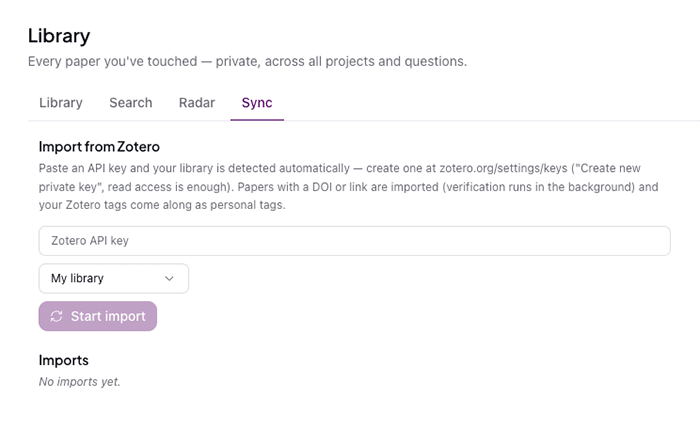
CoChat Library sync screen for Zotero

Bring Zotero in

• Paste a read-only API key, your library is detected automatically

• DOI or link papers import on their own, verified in the background

• Your Zotero tags come along as personal tags

THE WORKFLOW IT UNLOCKS

Discover, capture, connect, verify.
One loop, one place.

Library is built so each step feeds the one after it. That is the shift: stop re-gathering your papers for every project, and build on a corpus that grows more useful every time you use it.

Seed a research question with a search or a Zotero import. Then, screen and rank what comes back, so the strongest sources rise. Radar keeps the question fed with new papers on a schedule, and everything you keep is verified as it arrives.

When you sit down to write, your sources are already found, screened, ranked, and checked. They’ll flow straight into the literature review and citations you build next.

BEFORE / AFTER

A Pile vs. a System

The Pile

CoChat Library

Where papers live
Zotero, Scholar stars, Downloads, tabs, email alerts
One private home, across every project and question
Finding a paper again
Hunt across four tools
One search over your whole corpus
New papers
Forty alerts you meant to read
A short Radar queue, each with why it matched
Knowing what matters
Everything looks equal
Screened and relevance-ranked, so strong sources rise

Trust

Hope the reference is right
Every source checked against the academic record as it lands
Your existing library
Stranded in Zotero
Imported in, tags and all
WHY COCHAT

Library isn’t a nicer folder. It’s the difference between storing papers and building with them.

A reference manager files what you give it. It never asks whether the paper is real, the metadata right, or the source able to support your point. Library does, because it runs on the same verification as the rest of CoChat: every source checked against the academic record as it lands.

And because Library lives where you search, screen, and write, the papers you gather feed straight into your literature reviews and citations. You are not rebuilding your corpus each project, you are building on it.

12+ sources

arXiv, CrossRef, OpenAlex, PubMed, and more, from one place

Verified

Every source checked against the academic record as it lands

One home

Private, across all your projects and questions

Yours

import from Zotero, tags and all, no starting over

WHO USES IT?

Same home, different research

Same capability, different context. Click to see how the library supports work across fields and roles.

FAQ

Frequently asked questions

1. What is CoChat Library?
Library is your private home for every research paper you've touched inside CoChat, organized across all your projects and questions. You search the literature, keep what matters, watch questions for new papers with Radar, and import from Zotero, and every source is checked against the academic record as it comes in.
2. Which databases does Library search?
Library searches across arXiv, CrossRef, OpenAlex, PubMed, and more, in a single search with duplicates merged and an optional peer-reviewed filter. Anything you add lands in your Library in one click.
3. Can I import my Zotero library?
Yes. Paste a read-only Zotero API key and your library is detected automatically. Papers with a DOI or link import on their own, verification runs in the background, and your Zotero tags come along as personal tags.
4. What is Radar?
Radar watches your research questions for new papers. Create a question first, then Radar sweeps weekly or on demand and hands you a short queue, each paper with a note on why it matched and one-keystroke triage to add or dismiss. Dismissed papers do not come back.
5. How is Library different from a reference manager?
A reference manager files what you give it. Library finds papers across many sources, screens and ranks them by how much they matter, watches your questions for new ones, and verifies every source against the academic record as it lands, all in the same workspace where you write. It is the difference between storing papers and building with them.
6. Is Library private?
Yes. Your Library is private to you, holding every paper you've touched across all your projects and questions.

Start with one question.

Create one research question for something you are working on right now. Connect your Zotero key or run a single search to seed it, screen a few papers, then turn on Radar and let the next one find you.

Free to start. One private home for every paper you’ve touched.