


You know that feeling when you ask an AI to “write a Python script” and it gives you a code block you have to copy, paste, debug, and run yourself?
That era is over.
CoChat now ships sandboxed Coder workspaces for AI agents
Starting today, the LLMs in your CoChat conversations can spin up a full Linux development environment, write code, install dependencies, run tests, start servers, and tear it all down — without ever touching your machine.
No copy-pasting. No “here’s what you should run.” The AI actually runs it.
What does that look like in practice?
Here’s what happened when we pointed an LLM at a fresh workspace for the first time:
- Created a workspace — a full Ubuntu 24.04 sandbox provisioned in about 10 seconds.
- Wrote a Python module and tests — the LLM created a calculator library with history tracking, wrote 7 pytest tests, installed pytest, and ran them. All green. 0.03 seconds.
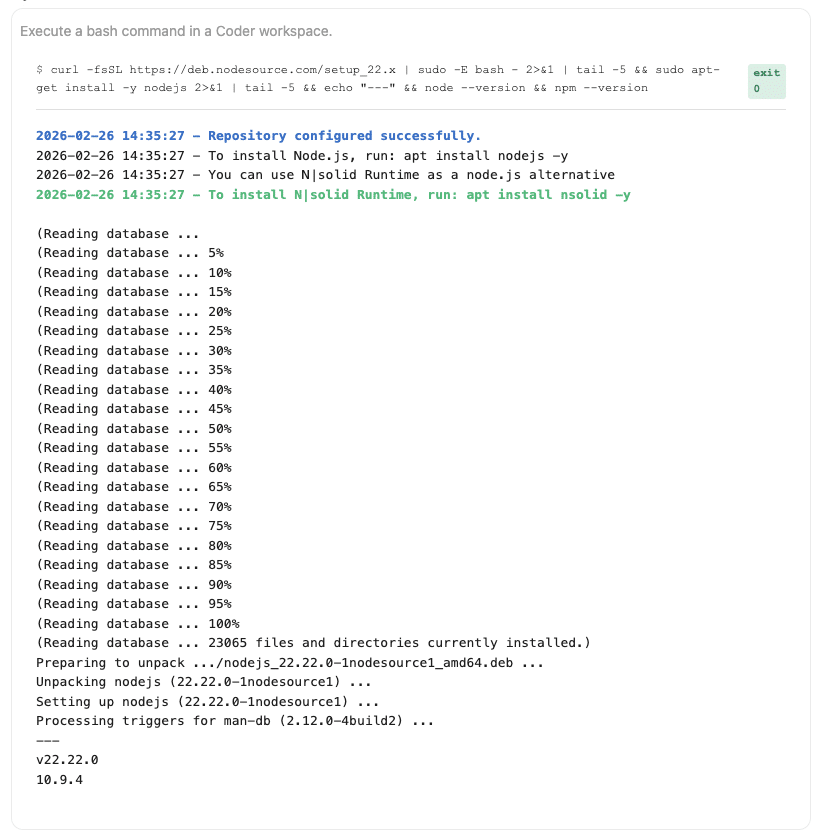
- Installed Node.js from scratch — ran
curl | bash, installed Node 22, set up an Express project withnpm init. - Built and tested a REST API — wrote a full CRUD todo API in Express, started the server, tested every endpoint with curl. POST, PATCH, DELETE, GET. All working. All from chat.
- Cleaned up — deleted the workspace when done. No leftover infrastructure. No bill surprise.
The entire session took about 4 minutes. From zero to a tested Python library and a running Node.js API. The LLM did all of it.
Why this matters
Most AI coding tools fall into two camps:
Camp 1: Code suggestion. The AI writes code, you run it. You’re still the middleware between the AI and the machine. Every error means another round trip of copy-paste-debug-ask.
Camp 2: Run on your machine. The AI gets access to your actual development environment. Powerful, but you’re trusting it with your real files, your real configs, your real credentials.
CoChat workspaces are a third option: the AI gets its own machine. A sandboxed environment where it can go wild — install packages, start servers, run tests — without any risk to your actual setup.
If the AI breaks something, you delete the workspace. Thirty seconds, clean slate.
What’s inside a workspace
Each workspace is a full Linux container with:
- Ubuntu 24.04 with root access
- Python 3.12 and pip
- Git 2.52 for version control
- Docker CLI for container workflows
- code-server (VS Code in the browser) if you want to jump in yourself
- curl, wget and standard Unix tools
- Persistent home directory that survives restarts
- apt-get, npm, pip — install anything you need
It’s not a stripped-down sandbox. It’s a real development machine.
Real use cases
“Debug this failing test suite.” The AI clones your repo, installs dependencies, runs the tests, reads the errors, fixes the code, and runs the tests again. You get a working fix, not a suggestion.
“Set up a new project with auth, database, and tests.” The AI scaffolds the project, installs everything, writes the boilerplate, and verifies it all compiles and passes before handing it to you.
“Can you benchmark these two approaches?” The AI writes both implementations, runs them, measures performance, and reports back with actual numbers.
“Prototype this API endpoint.” The AI builds it, starts the server, tests it with real HTTP requests, and confirms it works. You get a running prototype, not a code block.
How it works
From the LLM’s perspective, it has access to a set of workspace tools:
- Create/delete workspaces on demand
- Run bash commands with full shell access
- Read, write, and edit files in the filesystem
- Install packages and manage dependencies
- Start servers and test them
- Port forward to access running services
The workspace spins up via Terraform and provisions in seconds. When the LLM is done, it can stop or delete the workspace. No zombie infrastructure.
Security by default
Every workspace is isolated. The AI can’t access your local machine, your other workspaces, or anyone else’s environment. It gets its own container with its own filesystem and its own network.
This is the whole point. You get the power of an AI that can actually execute code, with the safety of knowing it’s contained.
Try it
Coder workspaces are available now in CoChat. Start a conversation, ask the AI to build something, and watch it actually build it.
No setup. No configuration. Enable the tool and just ask.
