


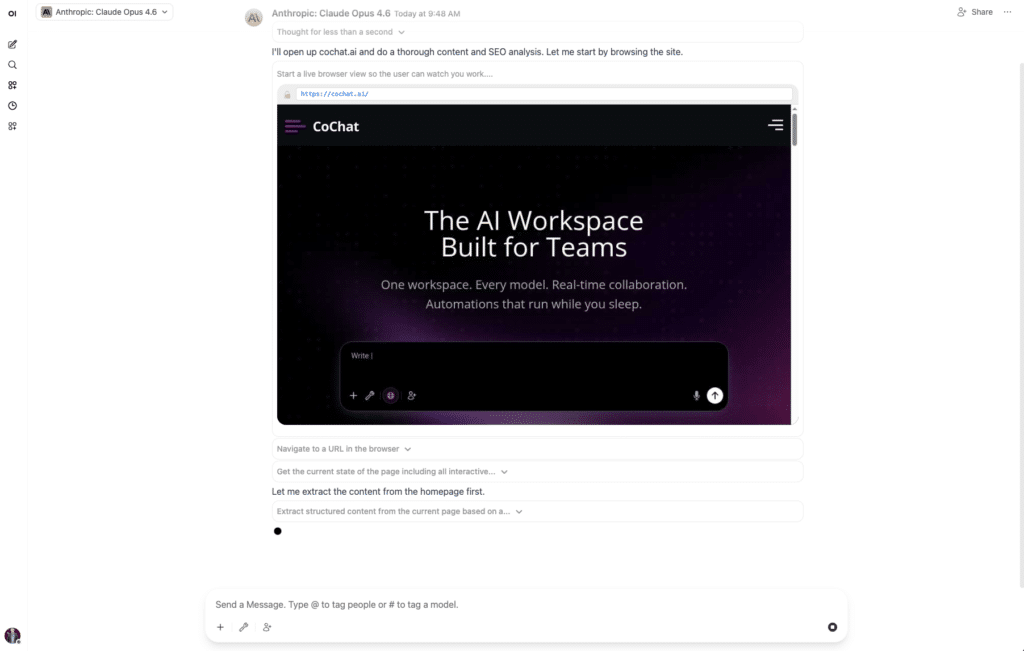
Most “AI workflows” break the moment they touch the real world. Today CoChat ships AI browser automation as an MCP tool, so your agents can act on the messy, login-gated web instead of stopping at the edge of it.
Because the real world is… websites:
- no APIs
- endless login walls
- dashboards that only exist behind SSO
- vendor portals designed by chaos
- UI that changes every week
We’re shipping Browser Use as an MCP tool inside CoChat. That means your CoChat agents can open a real browser, navigate, click, type, download, and extract data, all inside private, isolated VMs.
Three things make this actually usable in a team setting:
- The browser session can be streamed, so you can see what the agent is doing.
- Credentials can be passed through without the LLM ever seeing them.
- Sessions are remembered, so an agent can pick up where it left off.
This is the missing piece between “AI that writes plans” and “AI that ships work.”
What you get from AI browser automation
1) Browser control via MCP (not a toy web-scraper)
Under the hood, the model isn’t “guessing” what happened. It’s driving an actual browser session and interacting with the page structure, the same direction the ecosystem is moving with the Model Context Protocol and Playwright MCP accessibility-based browsing.
2) Private, isolated execution (Fly.io Docker session)
Every run happens in a private containerized browser session on Fly.io. You get the benefits of real browsing without turning your laptop into the runtime.
3) Live streaming for oversight and debugging
When an agent is doing something that matters, like submitting a form, downloading invoices, or updating a CRM, being able to watch it is the difference between “cool demo” and “usable tool.”
Streaming also makes debugging fast:
- see where it hesitated
- see what UI state confused it
- see which step failed, and why
4) Credential passthrough (without exposing secrets to the model)
A lot of “agent” products quietly solve auth by handing credentials to the model. We don’t. With CoChat AI browser automation, credentials are injected into the session without the LLM having access to the raw secret. This is what makes browser runs viable in real operations and team workflows.
Why AI browser automation matters: the highest-value work still lives behind a login
When people get value from browser agents today, it’s usually in one of these buckets:
A) “No API” workflows (ops and finance)
- Download invoices, receipts, and statements from vendor portals
- Pull monthly usage reports from tools that don’t expose the right endpoints
- Collect renewal dates, plan tiers, and contract details from admin consoles
This lines up with where AI web agents are gaining adoption: procurement, invoice retrieval, and cross-portal data extraction, precisely because traditional Selenium-style scripts are brittle and expensive to maintain.
B) Repetitive web ops (revenue and success)
- Enrich a lead list by checking each company’s website, pricing page, job posts, and tech-stack hints
- Verify inbound leads aren’t students, bots, or irrelevant with quick validation passes
- Update fields in CRMs that are “possible but painful” to do via UI
C) QA and monitoring (product and engineering)
- “Can a user still sign up and reach the dashboard?”
- “Did the pricing page change?”
- “Is the checkout flow broken in production?”
- Generate reproducible steps from a streamed run when something fails
D) Competitive and market intelligence (growth)
- Monitor competitor pricing and feature pages weekly and summarize diffs
- Track marketplace listings or app directories
- Pull structured data from sites that block basic scraping but allow normal browsing
Where AI browser automation fits with OpenClaw-style workflows
Browser access becomes really powerful when you combine it with what OpenClaw-type agents already do well: multi-step, goal-driven execution with tool calls. You can wire it up alongside workflows like sending an AI meeting summary to Slack for end-to-end runs that end with a team-visible update, not just a scraped file.
High-leverage patterns that map well:
1) Lead sourcing to enrichment to CRM update
- Find accounts matching your ICP
- Visit the site, LinkedIn, and “About” pages
- Extract signals: industry, headcount range, hiring, pricing-tier fit
- Write a short rationale plus a confidence score
- Push to CRM or spreadsheet
2) “Portal grunt work” for finance and ops
- Log into a vendor portal
- Download the latest invoices
- Rename files consistently
- Upload to Drive or attach to a record
- Post a summary in Slack or email (optional)
3) Support workflows that require web verification
- Reproduce a reported bug in the hosted app
- Confirm a customer configuration in an admin UI
- Capture evidence (screenshots and steps), with the streamed session as the audit trail
4) Web-to-internal-system bridging
When the source is only accessible in a browser (admin portals, legacy tools) but the destination is structured (Linear or Jira, HubSpot or Salesforce, Airtable, an internal DB), AI browser automation becomes the glue.
A few concrete AI browser automation prompts you can run in CoChat
- “Open our Stripe dashboard, find failed payments from the last 7 days, and summarize the top failure reasons.”
- “Log into [vendor portal], download this month’s invoice PDFs, and upload them to our Drive folder.”
- “Go through our signup flow as a new user, verify email, and confirm you land on the dashboard. Stream the run.”
- “Check competitor pricing pages for changes since last week and produce a bullet diff.”
- “Enrich this CSV of domains: pull company description, ICP-fit score, and likely buyer title.”
We strongly recommend starting with workflows that have clear success criteria (download X, verify Y, extract Z), then expanding.
What’s next for AI browser automation
Browser automation is one of those capabilities that’s either terrifying (if it’s uncontrolled) or transformational (if it’s governed). Our focus is making it the second one:
- isolated runtime
- streamable execution
- secret-safe auth
- team visibility
Want to try it? Spin up a workflow in CoChat (confirm link) and add the Browser MCP tool, or reply to this email.
Ship the work. Watch it run. Keep your secrets.
