


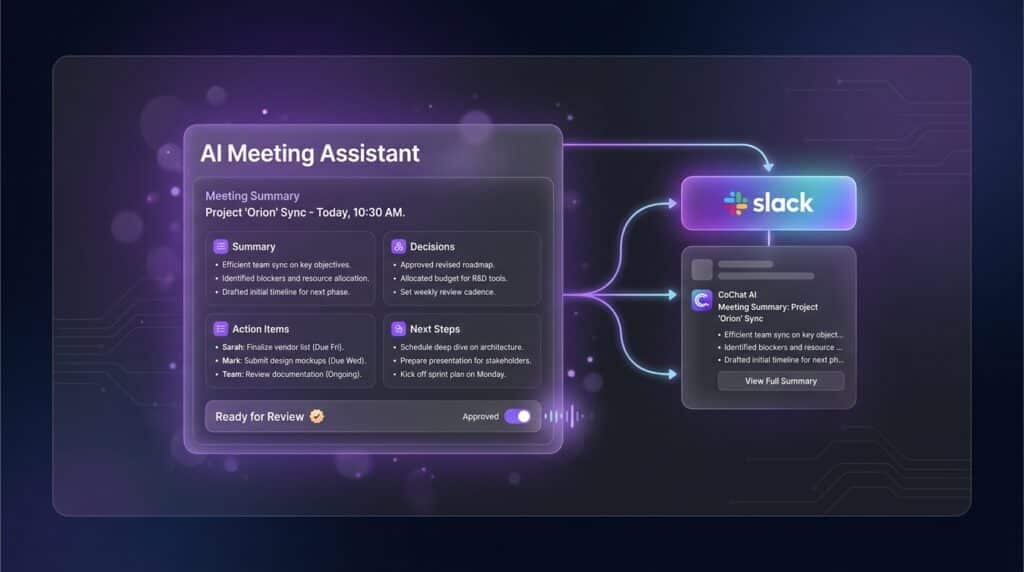
An AI meeting summary to Slack can save your team a surprising amount of time — but only if people trust what gets posted.
That’s the part a lot of tools miss.
Most teams already know the pain: the meeting ends, everyone leaves with slightly different interpretations, and then the real work starts in Slack. Someone asks what was decided. Someone else asks who owns the follow-up. A third person missed the meeting and wants the short version. Suddenly the team is recreating the recap in fragments.
A good meeting summary fixes that.
The best AI meeting summary doesn’t just recap the conversation. It gives your team a clear, reviewable version of what was decided, what happens next, and who owns it.
A good AI meeting summary does something even better: it turns a messy conversation into a clean, shared update your team can actually use. But for that to work, the summary can’t feel like a black box. It has to be visible, reviewable, and easy to trust — especially in a team setting, where people are understandably cautious about AI acting on its own. That trust issue is central to CoChat’s positioning: most users still do not want AI acting without human approval, and CoChat is built around agents that teams can review, approve, and trust.
That’s where CoChat fits.
CoChat is the team layer for AI agents. Agents build, monitor, and report. Teams review, approve, and ship. So instead of an AI bot dropping something into Slack and hoping for the best, you get a workflow your team can actually work with.
Why Send an AI Meeting Summary to Slack?
Because that’s where the work usually continues.
For a lot of teams, Slack is where decisions get clarified, next steps get assigned, and momentum either continues or disappears. If the meeting summary lives in one person’s notebook, a random doc, or a buried transcript, the team still has to go hunting for context
Posting the recap into Slack solves that. It gives everyone one shared version of:
- what the meeting was about
- what got decided
- what still needs an answer
- who owns what
- what happens next
That’s especially helpful for small teams, agencies, and operators who are juggling a lot of moving pieces and don’t have time for recap-by-osmosis. CoChat is explicitly targeting team leads at small agencies and sysadmins at small-to-medium companies, which makes this kind of workflow especially on-brand.
What Makes a Good AI Meeting Summary?
Not every meeting recap is helpful just because it’s fast.
A strong AI meeting summary to Slack should do a few things well.
1. Keep it short
Nobody wants a transcript in disguise. The team should be able to scan the summary quickly and understand the important parts.
2. Focus on action
The most useful summaries answer the questions people actually care about:
- What did we decide?
- What still needs a decision?
- Who owns the next step?
- When does it need to happen?
3. Use a clear structure
A simple format works best:
- quick summary
- key decisions
- action items
- owners
- deadlines
- open questions or risks
4. Make it reviewable
This matters more than people admit.
AI can help move faster, but teams still want human approval before something becomes the “official” version of what happened. CoChat’s messaging is increasingly centered on visible controls and “approve before sending,” because trust falls apart when AI acts without review.
Why CoChat Works Better Than a Basic Meeting Bot
Plenty of tools can spit out a summary. That’s not the hard part.
The hard part is creating a workflow your team will actually rely on. The summary needs to be:
- easy to review
- easy to share
- connected to the right context
- visible to the team, not trapped in one person’s private workflow
That’s what CoChat is built for.
CoChat isn’t just trying to be a smarter chatbot. It’s built around a different model: agents build, monitor, and report, while teams review, approve, and ship. That makes it a much better fit for something like meeting summaries, where accuracy, clarity, and shared visibility matter.
It also solves a product problem CoChat is actively watching: users often see chat, not agents, and never get to useful output quickly enough. One of the clearest ways to fix that is with workflows like this — practical, fast, and obviously useful.
If you want to see how that trust-and-visibility model plays out more broadly in Slack, CoChat recently wrote about it in Slack AI Automation for Teams: Real Workflows Your Team Can Review and Trust.
How to Send an AI Meeting Summary to Slack with CoChat
Here’s the practical version.
Option 1: Start With a Manual Workflow
This is the best place to start if the meeting matters and you want control before automating anything recurring.
Step 1: Bring the meeting content into CoChat
That could be:
- raw notes
- a transcript
- bullet points from the meeting
- a rough recap from whoever led the call
The input doesn’t have to be perfect. It just needs enough context for CoChat to work with.
Step 2: Ask CoChat to create a Slack-ready summary
Use a prompt like this:
Summarize this meeting for our team Slack channel. Include:
- a short overview
- key decisions made
- action items
- owner for each action item
- deadlines or timing if mentioned
- open questions or risks
Keep it concise, easy to scan, and useful for teammates who were not in the meeting.
Step 3: Review it before posting
This is the trust step.
Before sharing the summary in Slack, make sure:
- it didn’t overstate a decision
- it captured the right owners
- it didn’t miss an important caveat
- the action items are specific enough to be useful
That extra review step is often the difference between “helpful AI workflow” and “nobody trusts this thing.”
Step 4: Send it to Slack
Once it looks good, post it into the relevant Slack channel so the whole team has one clean version to work from.
That might be:
- a project channel
- a team channel
- a leadership channel
- an internal client account channel
Option 2: Turn It Into a Repeatable Workflow
Once you’ve done this a few times, the next step is making it repeatable.
This works especially well for:
- weekly team meetings
- client status calls
- internal ops meetings
- project check-ins
- leadership reviews
The basic pattern stays the same:
- bring the meeting context into CoChat
- have an assistant draft the summary
- review the output
- send the approved version to Slack
That flow is simple, but it matters. It keeps the speed benefit of AI without skipping the human trust layer that teams still want while automating the generation of valuable information to share in Slack.
Option 3: Use an Assistant Responsibility for Recurring Summaries
If you run the same meeting every week, CoChat can make the process more consistent.
You can:
- create a dedicated meeting summary assistant
- give it a recurring responsibility
- define the format you want every time
- send the approved output to Slack or a shared project chat
This is where CoChat starts to feel less like a one-off chat tool and more like a real team workflow system.
And if you want more context on CoChat’s Slack direction overall, this post is a natural companion read: CoChat Now Lives in Slack and Discord — and Delegates Tasks to Sub-Agents.
A Simple Format That Works Well in Slack
If you want the summary to feel useful in Slack, keep it structured and easy to skim.
Meeting Summary
A short paragraph explaining what the meeting was about and the main takeaway.
Key Decisions
- Decision one
- Decision two
- Decision three
Action Items
- Owner — task — deadline
- Owner — task — deadline
- Owner — task — deadline
Open Questions or Risks
- what still needs clarification
- what may block progress
- what needs a follow-up
Next Step
One line on what happens next.
That format works because it respects the way people actually read Slack: quickly, in context, and usually between ten other things.
Example Prompt You Can Paste Into CoChat
Here’s a stronger version you can use as-is:
Create an AI meeting summary for Slack based on the notes below. Write for a busy team that needs the important points fast. Include:
- A 2–3 sentence summary
- Key decisions made
- Action items with owners
- Deadlines or timing mentioned
- Open questions, blockers, or risks
- A final “next step” line. Keep it concise, specific, and easy to scan in Slack. Do not include fluff or transcript-like detail.
Why This Workflow Actually Sticks
This is one of those use cases that’s bigger than it looks.
A good meeting-summary-to-Slack workflow helps people experience CoChat as:
- useful quickly
- team-visible
- repeatable
- connected to real work
- better than a private AI side tool
That matters because CoChat’s growth plan is explicitly focused on high-intent SEO around jobs-to-be-done like “AI meeting summary to Slack,” plus more sharing, more team invites, and more messenger-first workflows across business chat apps.
In other words: this is not just a nice feature. It’s exactly the kind of workflow that helps users understand what CoChat is actually for.
Turn Meeting Notes Into Team Momentum
If your team already lives in Slack, the meeting follow-up process should not depend on one person remembering to write the recap later.
CoChat gives teams a better way to turn meetings into action. AI agents can summarize the conversation, pull out decisions and next steps, and prepare a Slack-ready update your team can review and trust before it goes out.
If you want more visibility, less recap chaos, and a workflow your team can actually rely on, CoChat is a strong place to start.
Try CoChat and send your next AI meeting summary to Slack with more clarity, visibility, and control.
