


Connect your tools. Power your AI. CoChat delivers AI integrations for teams that automate real workflows across 200+ apps, from Gmail to Notion to Snowflake to Figma.
The Problem With “AI Integrations”
Every AI platform claims it has integrations. Yet most teams are still copying and pasting between tabs. That is exactly the gap real AI integrations for teams should close, because CoChat brings your tools into one workspace so your AI can actually access, understand, and act across them.
Here’s the reality:
- Your AI can’t access your inbox
- It doesn’t know your campaign data
- It can’t see your design files
- And it definitely can’t take action across tools
So what happens? You become the integration layer.
Manually feeding context. Moving data. Triggering “automations” that aren’t actually automated.
That’s not AI you can rely on. Instead, it’s busywork with better branding.
CoChat: 200+ AI Integrations, One Workspace
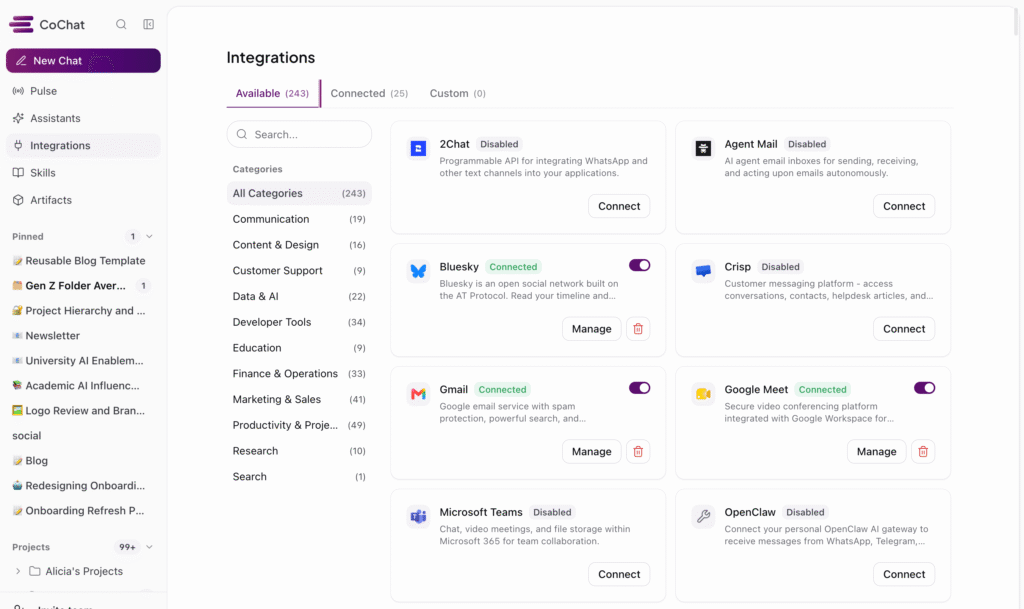
CoChat now connects to 200+ tools through a universal integration layer, giving your AI agents real access to the systems your team actually uses, from a sales stack to a research library. As an AI integrations platform, that means fewer tabs and less manual glue between them. This is what AI integrations for teams looks like in practice.
This includes:
- Gmail: Read, search, summarize, and draft emails
- Google Calendar: Manage schedules, create events, coordinate availability
- Google Analytics: Analyze traffic, funnels, and user behavior
- Semantic Scholar: Search 200M+ papers, pull citations, and surface related work
- arXiv: Search 2M+ preprints and pull papers straight into your research
- Figma: Reference design files and bridge design to development workflows
And that’s just the surface. CoChat integrations span:
- Marketing and sales platforms
- Developer and data tools
- Research and academic databases
- Learning management systems
- Internal tools and CRMs
This isn’t a “coming soon” roadmap. These are live integrations your AI agents can use right now. More importantly, they’re connections your team can actually trust your AI to use correctly.
What 200+ AI Integrations Actually Unlock
Having 200+ integrations isn’t about checking boxes. Instead, it’s about whether your team can trust your AI to use them correctly, and whether it can actually drive outcomes, not just execute tasks.
Automations That Actually Automate
Before:
- Export Google Analytics data
- Pull Google Ads performance
- Combine spreadsheets
- Write summary manually
After:
- One CoChat automation runs on a schedule
- Pulls from all sources
- Generates a formatted report
- Delivers it to your team
As a result, your team reviews it instead of rebuilding it, because they trust where it came from. Want to see how teams are building real workflows? Explore our guide to AI workflow automations for teams.
AI Agents With Real Context
Traditional AI tools reset every time you start a new task. By contrast, CoChat agents connect directly to your systems, meaning they understand:
- Your campaign structure
- Your analytics setup
- Your calendar and priorities
- Your actual business context
So when you ask: “How did our campaigns perform this week?”
You get:
- Live data
- Real analysis
- Actionable insights
Not guesses based on pasted inputs. And because that context is shared and persistent, your team isn’t second-guessing every output. Instead, they’re building on it.
Cross-Tool Workflows
Ultimately, this is where AI shifts from task execution to outcome ownership. The real power shows up when agents work across multiple integrations in a single workflow:
- Lead follow-up New form submission → check CRM → draft email → schedule follow-up
- Campaign reporting Pull ad performance → cross-reference analytics → summarize insights → share with team
- Design-to-dev handoff Reference Figma → generate specs → create tickets → notify engineering
- Literature review Search arXiv and Semantic Scholar → verify citations in CrossRef → build a literature review table → export to your reference manager
None of this is theoretical. Your team can build these workflows today and rely on them. In fact, they are the same workflows teams are already creating with AI-powered automations inside CoChat.
“AI doesn’t create value by completing tasks. It creates value when teams can trust it to drive outcomes.”
Notable Integrations Across Your Entire Stack
CoChat connects to the tools your team already relies on, across every function.
Marketing & Growth Google Ads · Meta Ads · LinkedIn · HubSpot · Klaviyo · ActiveCampaign · SEMrush · Moz · Google Search Console · Segment · Mixpanel · Amplitude
Sales, CRM & Customer Data Salesforce · HubSpot · Pipedrive · Attio · Apollo · ZoomInfo · Intercom · Zendesk · Zoho · Microsoft Dynamics
Product, Engineering & Dev Jira · Linear · Confluence · Bitbucket · Docker Hub · Vercel · Sentry · New Relic · PagerDuty · Postman · Cloudflare
Design, Content & Collaboration Figma · Canva · Miro · Notion · Coda · Google Docs · Google Slides · Typeform · Wix
Communication & Team Tools Slack · Microsoft Teams · Zoom · Webex · WhatsApp · Sendbird · Google Meet
Data & Analytics Snowflake · BigQuery · ClickHouse · Metabase · Microsoft Clarity · Google Analytics
Ecommerce, Finance & Operations Shopify · QuickBooks · NetSuite · Stripe · Square · Xero · Brex · Ramp · Coinbase
Research & Academic arXiv · Semantic Scholar · PubMed · Europe PMC · CrossRef · OpenAlex · CORE · BioRender · NASA
Education & LMS Canvas · Blackboard · D2L Brightspace · Google Classroom · Accredible · Certifier · ClassMarker · Coassemble · Dictionary API
APIs & External Data Google Maps · OpenWeather · News API · NASA · Spotify · Giphy · Tripadvisor
This is what modern AI integrations for teams should look like: connected, reliable, and built for real work.
New to AI research tools? See how CoChat compares to Consensus for research workflows, or explore the best AI research tools.
Built With Security in Mind
More integrations means more surface area, and therefore that requires real control. Every connection in CoChat includes:
- Security scanning (225+ CVE checks)
- Automated auditing
- Approval flows and permissions
- No direct infrastructure exposure
Because trust in AI does not come from what it can do. It comes from knowing how it behaves, what it can access, and how it’s controlled.
How It Works
Setting up a new integration takes about a minute:
- Open your CoChat workspace
- Browse integrations
- Connect via secure OAuth
- Assign access to agents
- Start building workflows
No code. No manual setup. Zero friction.
The Shift: From AI Tools to AI You Can Trust
Most teams don’t struggle with access to AI. Instead, they struggle with trusting it enough to rely on it.
- Can it access the right data?
- Does it understand context?
- Will it behave consistently?
- Can your team see what it’s doing?
However, that’s the gap most tools don’t solve. CoChat does.
What That Looks Like
Instead of:
- Isolated outputs
- Disconnected automations
- Workflows only one person understands
You get:
- AI operating inside your systems
- Workflows your team can see and trust
- Outputs grounded in real data
Confidence Changes Everything
When your team trusts the system:
- You stop re-checking every output
- You stop rebuilding workflows
- You stop acting as the glue between tools
As a result, AI shifts from something you use to something your team relies on.
The Bottom Line
In short, AI doesn’t create value by completing tasks. Instead, it creates value when it helps teams reach outcomes. That requires more than prompts or automations.
It requires AI that can:
- Access the right data
- Understand full context
- Operate across systems
- Execute reliably
- And produce results your team can trust
That’s the shift CoChat is built for. From AI that helps, to AI that actually drives work forward.
Get Started
Finally, all 200+ integrations are available now. 👉 Log in and unlock their potential.
Your AI is only as powerful as what it can access, and how much you trust it to use it. Now, you don’t have to choose between the two.
