Ask any researcher where their papers live and you’ll get a slightly embarrassed answer. Some are in Zotero. A few are starred in Google Scholar. There’s a folder on the desktop called to read that hasn’t been opened since March. Eleven PDFs are sitting in Downloads with names like 1706.03762v5.pdf. And somewhere in your inbox are forty Scholar alert emails you fully intended to read.
None of that is a system. It’s a pile. And the cost of a pile isn’t just the annoyance of digging through it. It’s the paper you know you read but can’t find when you’re writing. The study you cite from memory and hope you got right. And the afternoon you lose re-running the same search across four databases because you can’t remember which one had the good result.
Library is our answer to the pile. It’s a private space inside CoChat that holds every paper you’ve touched, across all your projects and research questions, in one place you can actually search and trust. This post walks through what it does and, more usefully, how a real research workflow moves through it: starting with a question, pulling papers in, sorting them, scoring what matters, generating summaries you can lean on, and setting up alerts so the next important paper comes to you instead of slipping past.
Why a research library matters more than a folder of PDFs
A folder stores files. It doesn’t help you think. The problem with organizing research by filename or by date-downloaded is that neither one maps to the thing you actually care about, which is the question you’re trying to answer.
When your papers are organized around questions, a few things get easier at once. You can:
- See how much evidence you’ve actually gathered on a topic instead of guessing.
- Tell the difference between a paper you’ve read and screened and one you just grabbed.
- Hand a colleague a clear picture of where a review stands.
And when you sit down to write, your sources are already grouped the way your argument is, so you’re building from a structure instead of from a heap.
There’s a second reason, and it’s the one we care about most. Research runs on trust. A citation is a small promise that the source is real and says what you claim it says. Library checks that promise for you by verifying papers against the academic record as they come in, so the corpus you build isn’t just organized, it’s dependable. That matters whether you’re a PhD student assembling a literature review or a professor who simply can’t afford to cite something that turns out to be a mirage.
Start with a question, not a search
Most tools want you to start by searching. Library works better when you start by naming what you’re trying to figure out.
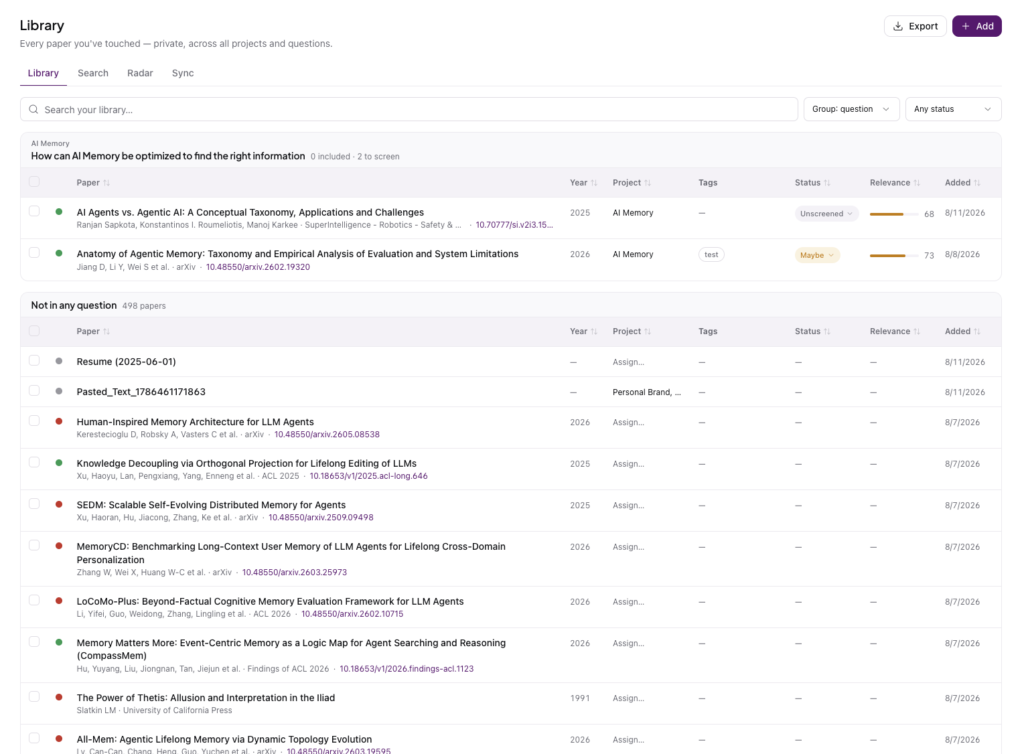
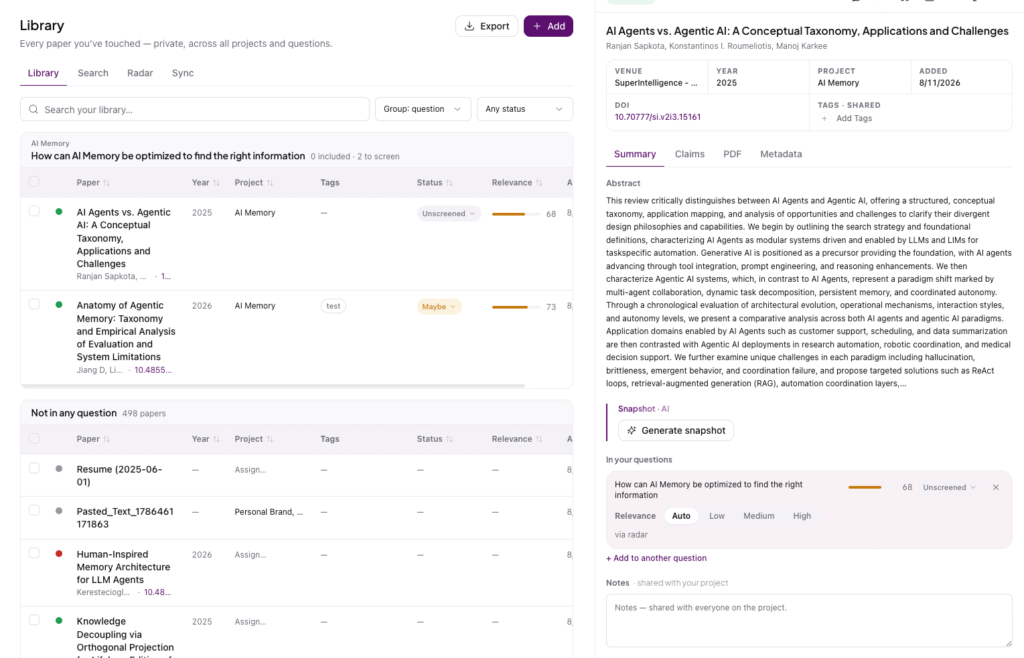
A research question in Library is exactly what it sounds like. Something like “How can AI memory be optimized to find the right information?” You create the question first, and it becomes the home that papers get sorted into. Every question shows you two numbers that tell you where things stand at a glance: how many papers you’ve included, and how many are still waiting to be screened. Zero included and two to screen means you’ve got reading to do. It’s a small thing, but it turns a vague sense of “I should look into this” into a visible, finite task.
The question also becomes the anchor for everything else.
- Your searches can be attached to it.
- Your alerts watch it.
- Your snapshots summarize against it.
Instead of a flat library where everything sits at the same level, you get a workspace shaped like your actual research.
Bring your existing papers in
You’ve already done years of work. Library doesn’t ask you to throw it away.
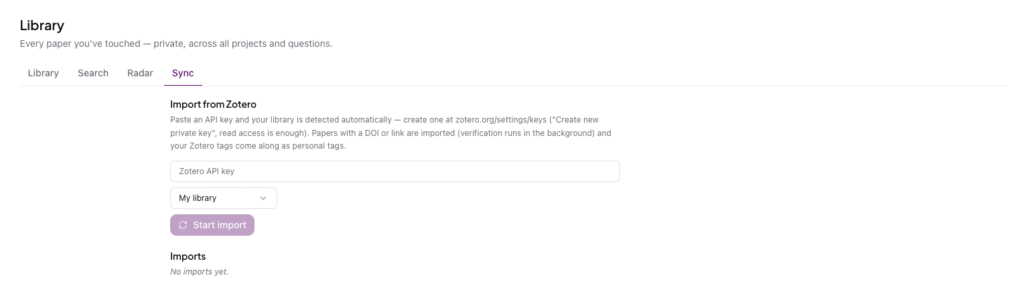
If you use Zotero, head to the Sync tab, create a read-only API key at zotero.org, and paste it in. Library detects your library automatically and imports it. Any paper with a DOI or a link comes across, your Zotero tags follow along as personal tags, and verification runs quietly in the background while you get on with your day. So you’re not just copying references from one box to another. You’re importing them into a place that’s checking them against the record as they land.
If you’d rather find something new, the Search tab runs one query across four major sources at once: CrossRef, Semantic Scholar, arXiv, and OpenAlex. A single search can return well over a hundred results, and Library merges the duplicates so you’re not scrolling past the same paper four times in slightly different clothes. You can filter to peer-reviewed work only, sort by relevance, and add anything promising straight to your library. If you’re not sure whether a paper is worth keeping, you can ask about it before you commit, which is a lot faster than opening the PDF and skimming for ten minutes.
Triage: sort papers into the questions they answer
This is where the pile becomes a system.
When papers come into Library, they don’t have to belong to anything yet. Plenty will sit in a general pool, useful but unsorted. Triage is the act of deciding which question each paper actually speaks to, and how seriously you should take it.
Each paper carries a status you control. A new arrival is Unscreened. As you read, you move it to Maybe if it’s a contender, to Included once it earns a place in your review, or you set it aside if it doesn’t fit. Those statuses aren’t decoration. They’re what feed the counts on each question, so as you screen, the “2 to screen” ticks down and the “included” ticks up, and you can see your review taking shape in real time.
The reason this feels good rather than tedious is that the decisions are small and concrete. You’re not reorganizing everything at once. You’re answering one question per paper: does this belong here, and how much? Do that a few times and a messy import turns into a screened, sorted set of evidence you can defend.
Set relevancy so the important papers rise
Not every included paper matters equally, and pretending they do makes a review harder to navigate.
Library gives each paper a relevance score against the question it’s attached to, shown as a simple number and a little bar so you can scan a list and see what’s carrying weight. You can let CoChat set relevance automatically, or you can override it and mark a paper Low, Medium, or High yourself when you know something the score doesn’t. A landmark paper that’s central to your argument gets pushed up. A tangential one that’s technically related but not really load-bearing settles down where it belongs.
Over time this is what keeps a large question usable. When you’ve got sixty papers under one question, relevance is the difference between a list you dread and a list you can actually work from, because the ten that matter most are sitting right at the top.
Get snapshot summaries you can actually use
Reading is the job, but re-reading everything every time you need to remember what a paper said is a waste.
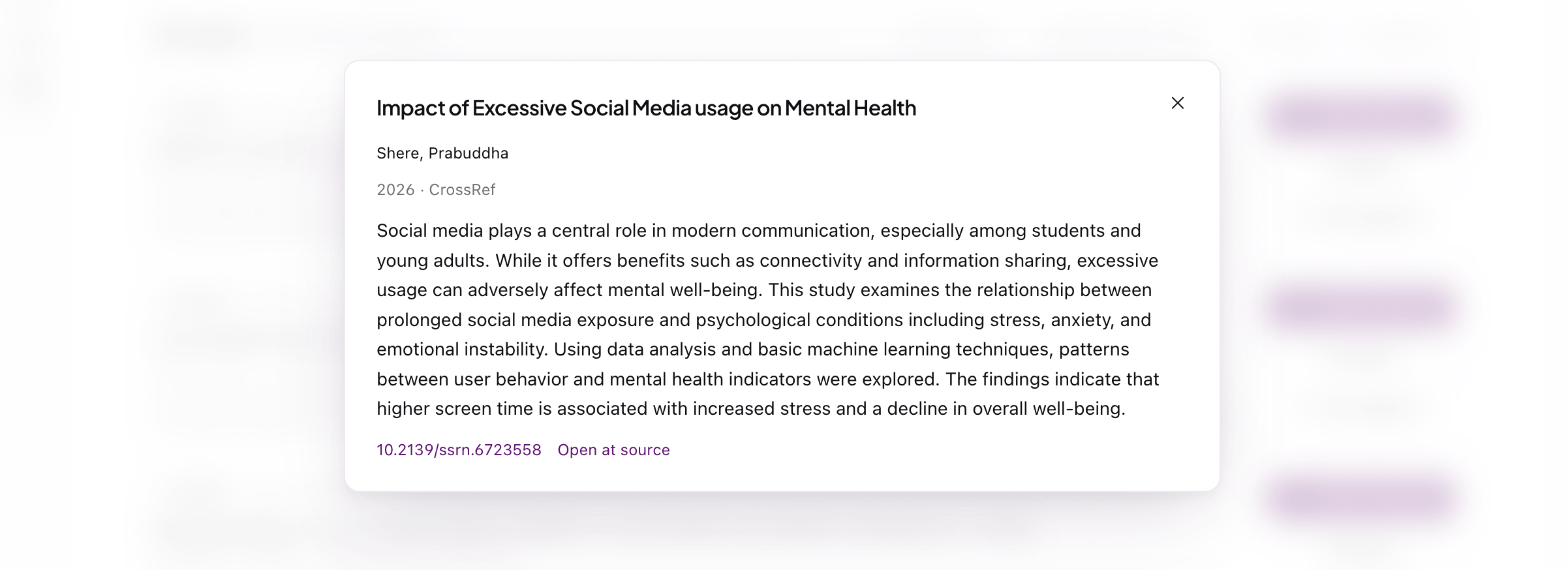
Open any paper in Library and you get more than a title and an abstract. There’s a Claims view, the full PDF, and the metadata, all in one place. You can also generate a snapshot, which is a focused summary of the paper written against your question rather than a generic blurb. So instead of “here’s what this paper is broadly about,” you get something closer to “here’s what this paper contributes to the thing you’re trying to answer.”
That framing is the point. A summary that ignores your question makes you do the translation yourself. A snapshot that’s aware of your question does that work for you, which means when you come back to a paper three weeks later you can reload the relevant part in seconds. You can also drop notes on a paper that everyone on your project can see, so the context you build up doesn’t evaporate when you close the tab or hand the work to a collaborator.
Set Radar alerts and let new papers come to you
Here’s the part that changes how you keep up. Most of us rely on Google Scholar alerts, which means new papers arrive as emails, pile up unread, and quietly become a source of guilt instead of a source of papers.
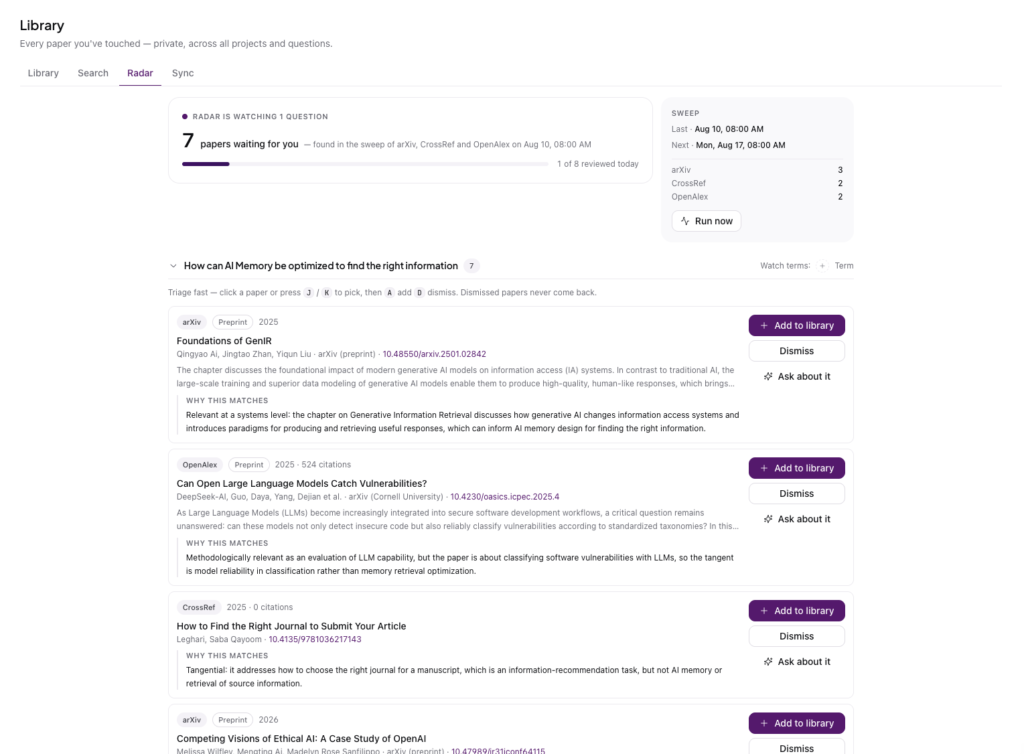
Radar flips that around. You point it at a research question and it sweeps arXiv, CrossRef, and OpenAlex on a schedule, then hands you a tidy queue instead of an inbox. “7 papers waiting for you,” grouped under the question they relate to, refreshed on a regular cadence so you always know when the last sweep ran and when the next one is coming. You can also run a sweep on demand if you don’t want to wait.
What makes Radar worth opening is that it explains itself. Every result comes with a short note on why it matched your question, so you can tell at a glance whether a paper is genuinely on target or just brushed up against your keywords. Some will be squarely relevant. Others will be tangential, and Radar says so plainly, which saves you the click. Triage is built for speed: arrow through the queue, press a key to add a paper to your library or dismiss it, and move on. Dismissed papers don’t come back, so the pile never rebuilds itself behind you.
The effect over a few weeks is quietly powerful. Instead of chasing the literature, you get a short, explained, de-duplicated list of new work on exactly the questions you care about, and adding a keeper to the right question takes one keystroke.
The whole loop, in one place
Step back and the pieces line up into a workflow: discover the papers that exist, capture them into a private and verified corpus, connect them to the questions they answer, and keep the whole thing trustworthy from search to citation. Your Zotero history flows in on one side. A live Radar feed of what’s coming next arrives on the other. Your questions sit in the middle, holding it together.
That’s the real shift. Library isn’t a nicer folder. It’s the difference between storing papers and building something with them. You start with a question, pull in what’s known, screen it down to what matters, score what matters most, summarize it against what you’re actually asking, and then keep a standing watch for whatever comes next. The pile is gone. What’s left is a research process you can see, trust, and hand to someone else.
If you want to feel the difference, start small. Create one research question for something you’re actively working on. Connect your Zotero key or run a single search to seed it. Screen a handful of papers into it, then turn on Radar and let the next one find you.